Lab
Primary surfaces use META + ED + Anchor when configured. Sign in from Lab login to scope a household.
- Guided demoCreate Your Demo HouseholdSet up a guided demo household and explore TS360 as a parent, co-parent, or reviewer.Start guided setup →
- Featured demoWhat Actually HappenedSee how one event is captured, connected, and proven.
- Contrast demoWhen Things Fall ApartSee how the same event becomes unclear when nothing holds it.
- Primary · HouseholdHousehold ViewHousehold name, family, members, profile, shortcuts, timeline preview, safety placeholder.
- DashboardActor HomeComposed snapshot: expenses, child items, vault, timeline — lab session required.
- ShellTS360 iPhone labMobile-sized shell over the same lab session and APIs.
- Playground · GuidedGolden Path DemoRun the full META → BM → ED → ANCHOR proof flow.
- Visual · Demo companion
Expense Flow (Record → Document → Proof)
How an expense becomes a record, links documents, and is proven in Anchor.
See how an expense moves through ED, links to documents, and writes proof to Anchor.
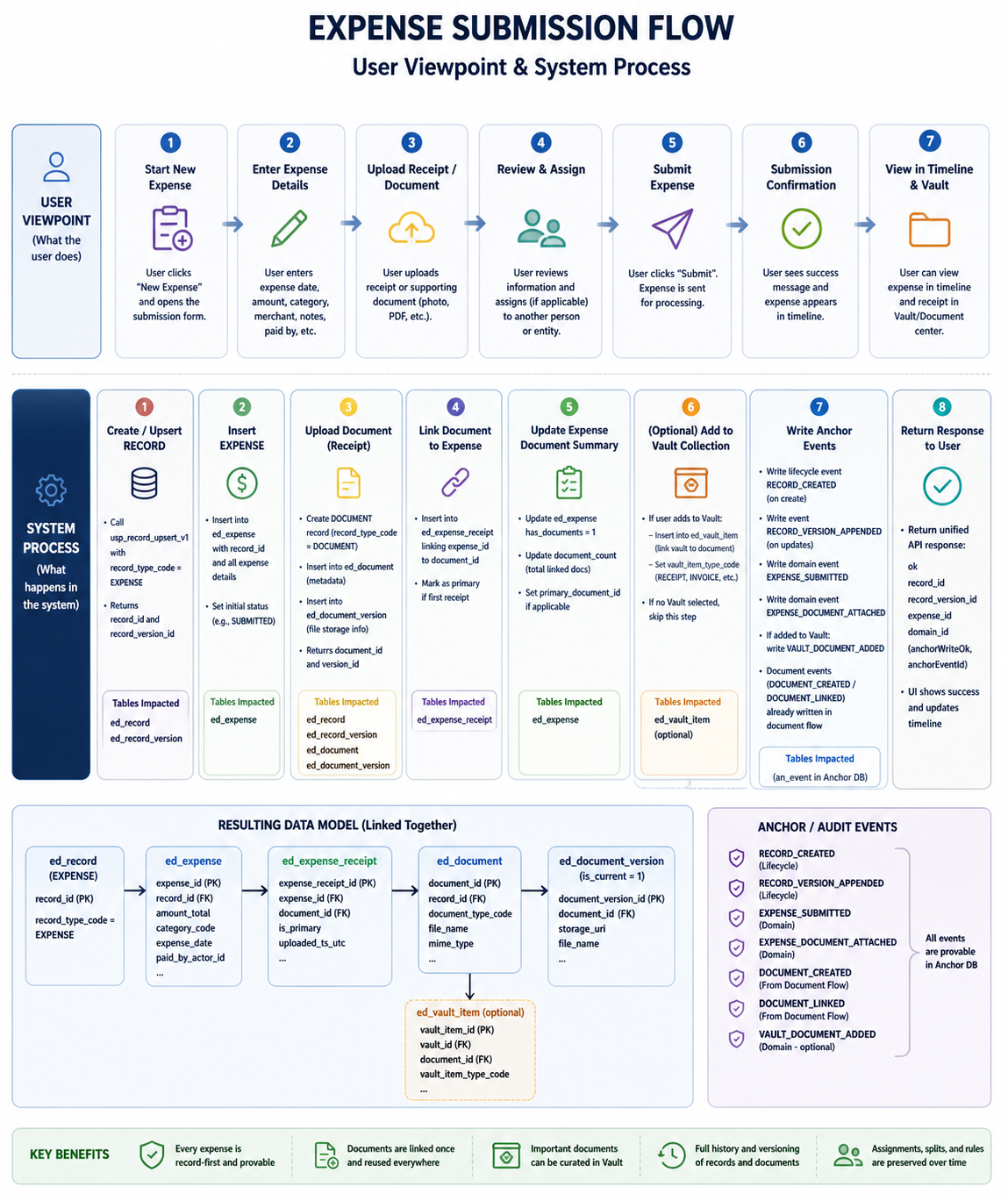
- • Create record (ED)
- • Add expense details (ED)
- • Upload receipt (ED)
- • Link document / receipt (ED)
- • Add to Vault (optional)
- • Write Anchor proof (ANCHOR)
Opens Playground new expense with full-demo mom (Emily Carter) actor_id and household pre-filled; edit the URL to use another demo actor if needed.
- ED read labParenting plan (read-only)Full plan graph from AE_ED_DEV — matches SECTION 2 of seed_ts360_demo_full_next_month.sql when seeded.Open demo plan →
- ED read labParenting plan (fixture)Carter–Rivers static simulation plan — no product ED lookup.
- Admin personaAdmin entryOpens Actor Home with the admin preset when seed users are present.
- META setupFamily + household setup (DDL lab)Optional schema helpers for local META — not required for Household View reads.
- Platform referenceDharma Init · ArchitectureECA standards, AOS, and platform ontology live in Dharma Init — not under TS360 product routes.Open Dharma Init →
- Marketing demos →